Control centre
Control centre
One screen the whole business runs from. It arranges itself around whose day it is — front desk, groomer, boarding, vet room — and looks back a day or ahead a day without leaving the page.
Used daily by · Everyone, differently
What Control centre does
Most dashboards are a wall of numbers nobody acts on. This one opens with what is already late — a dog past his collection time, a care task overdue, a finished job nobody billed — and disappears entirely when there is nothing wrong. Then it shows the day, arranged around the job you actually do: a groomer opens on their own board, the front desk on who is arriving and what is owed, boarding on which runs go home today. Yesterday and tomorrow are one press away, because half of what a pet business says out loud is 'what did we do with him on Tuesday'.
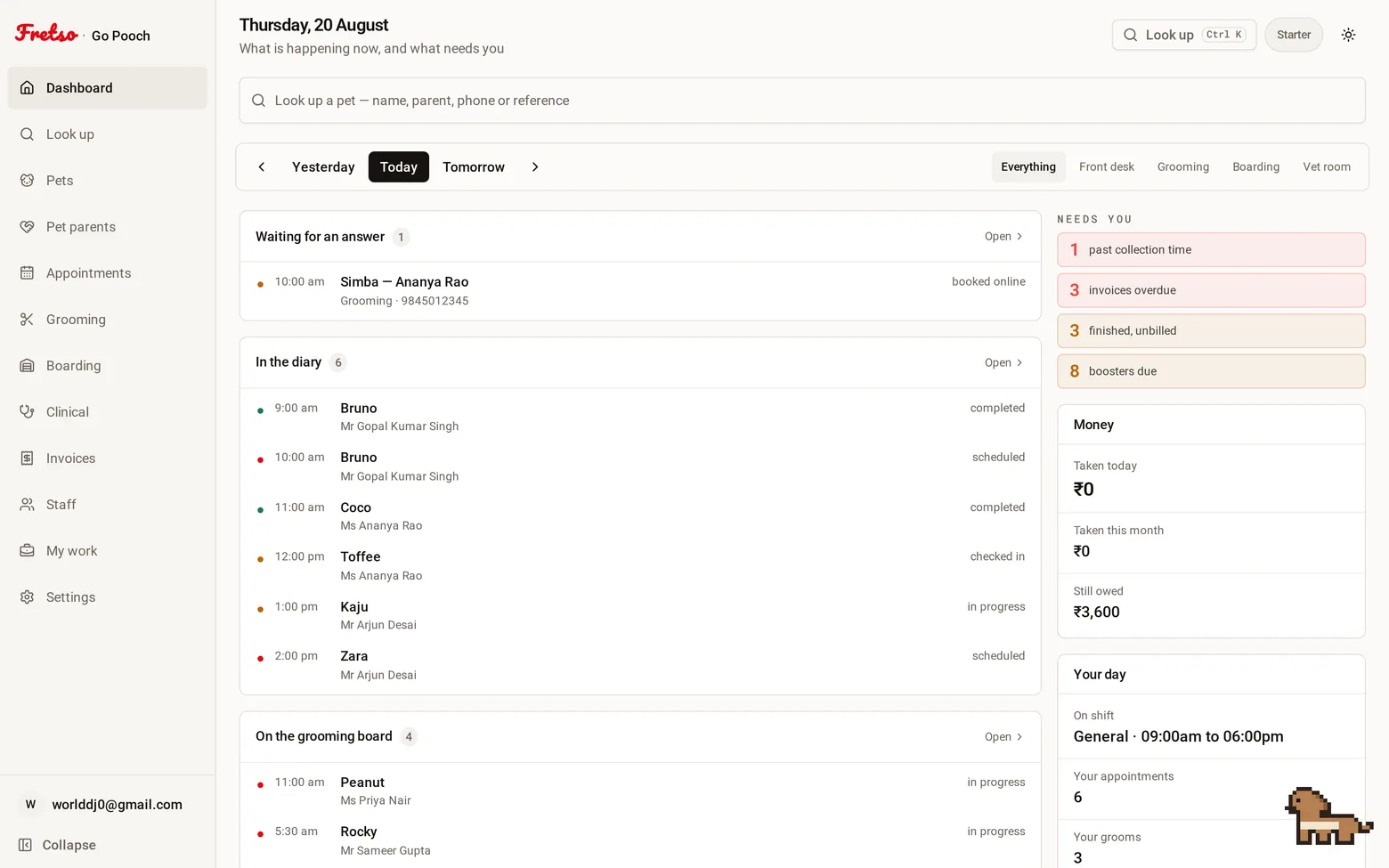
A real screen from Fretso
Capabilities
Inside Control centre
01
It arranges itself around your job
Front desk, groomer, boarding, vet room. The same components in a different order — a groomer should not scroll past kennel occupancy to find their own table. An owner sees all of it and can look through any of the four, which is what you want on the morning somebody calls in sick.
02
Yesterday and tomorrow, one press away
Half the questions in a pet business are about a different day. What did we do with him on Tuesday. What have we got coming in. The day moves without leaving the screen — and the "already late" list only appears on today, because it is a statement about now rather than a number that would be wrong on any other date.
03
What needs you, first
Overdue collections, care tasks past due, stays with no kennel, invoices overdue, finished work not yet billed, boosters coming up. Each one a link to the screen that fixes it.
04
Today, across every part of the business
Bookings today and still to come, who is on the groom board, who is in the kennels, open consultations. One card per module, each a way in.
05
Your day, whoever you are
Your shift, your appointments, your grooms, your consultations, and what you have earned this month.
06
Money, for the people it belongs to
Taken today, taken this month, still owed, overdue. Owners, admins and managers only — and the figures never even reach anyone else’s browser.
07
A first week that tells you what to do
A new business gets a setup checklist instead of a grid of zeros, and each line disappears as you do it.
The flow
How a day runs in Control centre
- 01
Open the app in the morning
- 02
Deal with whatever is already late
- 03
See the day across grooming, boarding, clinical and the diary
- 04
Check your own list
- 05
Look at the money, if it is yours to look at
Guides on this
How many kennels do I need for a boarding business
Most kennels are built to a guess and then run at 50% for ten months of the year. Here is the arithmetic to do first.
Boarding kennel and daycare owners · 9 min read
Getting a pet business off spreadsheets without losing a month
What to migrate, what to deliberately abandon, and the order that keeps you trading while you switch.
Owners switching systems · 9 min read
What to charge for dog boarding: a method, not a guess
Work out your cost per run per night, then price up from it. Includes the peak-season pricing most kennels leave on the table.
Boarding kennel and daycare owners · 8 min read
Works with
Look up
One search box that takes a pet's name, the owner's name, a phone number, a microchip or any reference — and puts that animal's whole history on one screen.
Appointments
One diary for grooming, boarding, daycare and the vet room, with reminders that go out on their own and a calendar invite the customer can actually add.
Grooming
A board of who is in, who is on the table and who is ready, with prices that already know the breed, photos on the file, and commission that adds itself up.
Next step
Want to see Control centre on your own workflow?
Twenty minutes on the real software, walked through the way you actually work. No slide deck, and nobody chases you afterwards.